Create your link page in 2 minutes
One link page for all your social media links, your website and everything you make, sell or recommend. Share it with one link in every bio. Start free, every feature, no credit card.
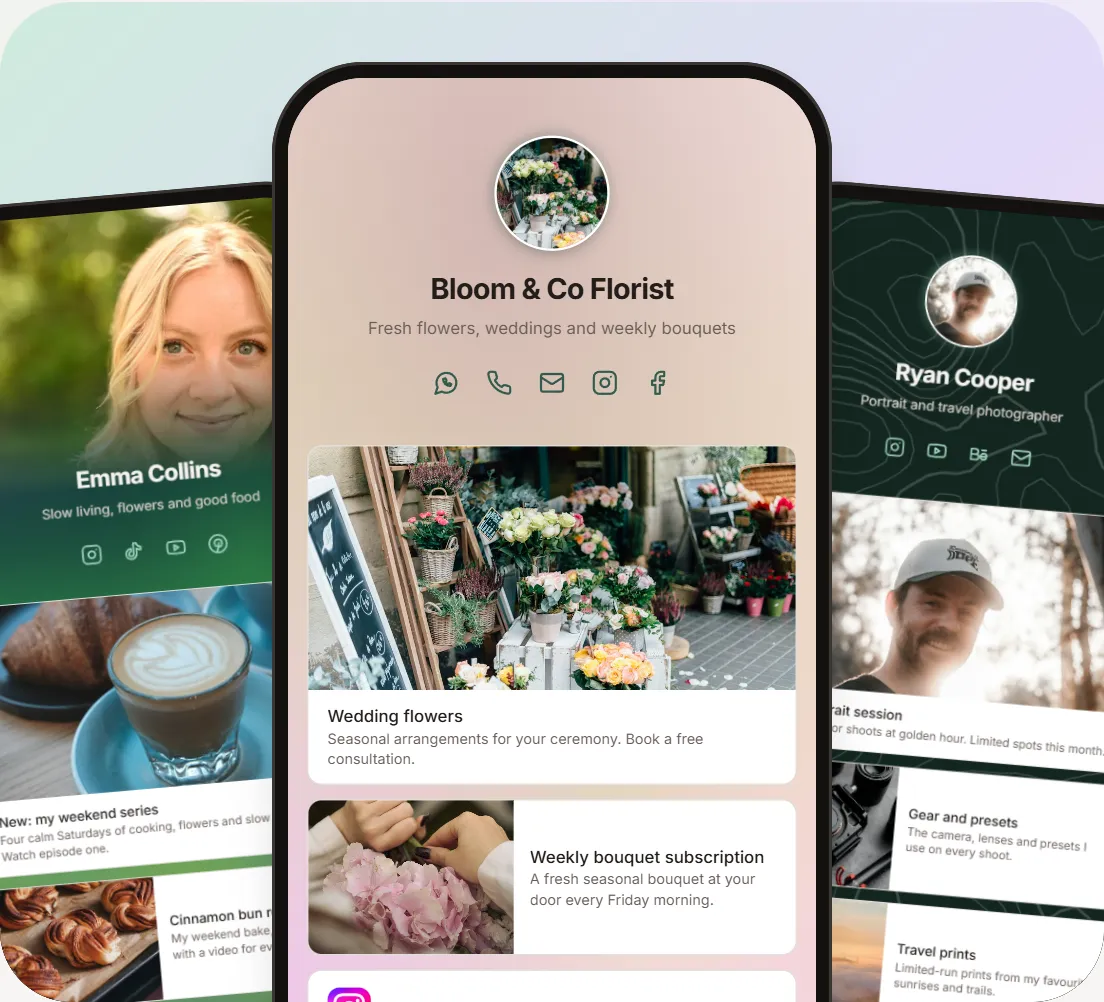
ProfileLinkHub pages
What is a link page? A link page is a single web page that holds all your links: your social media profiles, website, shop, booking page and latest posts. You put its one address in your Instagram, TikTok, YouTube or LinkedIn bio, and visitors pick where to go from there.
One link in your bio isn't enough
Instagram, TikTok, YouTube and LinkedIn each give you one spot for a link, but you have a website, a shop, a booking page, your other social media profiles and a new post every week. Swapping the link every time is tiring, and visitors who miss it don't come back.
How to create a link page in 3 steps
- Create your account. Sign in with Google or LinkedIn. Your link page is created instantly, with no design or coding needed.
- Add your links. Paste a link and ProfileLinkHub adds the website's own icon and picture. Choose Small, Medium or Large for each link and shuffle a background.
- Share it. Copy your page's address and put it in your social media bios, email signature and anywhere else you only get one link.
Need more detail? See the step-by-step guide: how to create your link in bio page.
Video transcript
- 0:00 Link in Bio by ProfileLinkHub: one link for everything you share.
- 0:03 Step 1, one link in your profile. Sarah Mitchell, a consultant and brand strategist, adds profilelinkhub.com/sarahmitchell to the website field of her profile.
- 0:07 Step 2, a page with all your links. That one link opens her mobile page, with social icons under her name, a large Book a Consultation link with a photo, a Newsletter link with a picture, My Website and Portfolio under the heading My work, and LinkedIn and Twitter / X under Follow me. A visitor taps Book a Consultation.
- 0:13 Step 3, see who visits and clicks. Her analytics dashboard (example data, last 30 days) shows total views, unique visitors, total clicks, click rate, views per day and top traffic sources: LinkedIn, Instagram, Newsletter and Direct.
- 0:21 Start for free at ProfileLinkHub.com. No credit card required.
What to look for in a link page tool
Each picture shows a ProfileLinkHub page.
Designed so visitors know where to click
On many link in bio pages every link looks the same, so visitors guess, and guessing visitors often leave without clicking anything. ProfileLinkHub is designed by UX experts and marketers.
Three link sizes that get tapped
ProfileLinkHub gives every link a size. Small is a clean row with the website's own colorful icon, Medium adds a picture on the left, and Large puts a full-width picture on top.
Know where visitors come from, and what they tap
ProfileLinkHub analytics show where visitors come from, which links they tap, and which days of the week bring the most visitors.
Slow pages hurt your conversion
Many link in bio pages take a long time to load, and visitors don't wait. ProfileLinkHub pages are built for phones first, so they open fast.
Automatic icons and pictures
Paste a link and the website's own icon and picture are added for you.
Your own URL
Pick the address after /bio/ and change it from your dashboard.
No ads
Visitors see your links, not adverts.
Unlimited links
Add as many as you need, and drag to reorder.
Free link page options compared
A free link page can mean three different things. Here's what each gives you:
| Free-forever link page plans | Free HTML link page generators | ProfileLinkHub | |
|---|---|---|---|
| Cost | $0, with limits | $0 | Start free, then $4/month billed yearly ($48/year) or $5 monthly. See pricing |
| Hosting | Hosted for you | You host the file yourself | Hosted for you |
| Change links later | Yes | Make and upload a new file | Yes, from your dashboard |
| Analytics | Basic or short history | None | Click, view and referrer analytics |
| Mobile optimized | Usually | Depends on the template | Yes, built for phones first |
| Design | Shared themes, so pages often look alike | A few basic themes | Stunning designs, with a background you can shuffle |
| Gets the clicks that matter | Links usually look the same | A plain list of links | Small, Medium and Large links lead visitors to your most important link |
| Designed by | Varies | You, from a template | Marketing and UX experts |
| Easy to use | Usually | Needs a little technical work (hosting, uploading) | Yes: paste a link, icons and pictures are added for you |
The first two columns describe common types of free tools in general, not one product. Our own summary, November 2026.
Link page questions
A single web page that holds all your links, shared with one address. People put it in their social media bios, where apps allow only one link. A ProfileLinkHub page is one example.
Sign in to ProfileLinkHub with Google or LinkedIn, add your links and share your page's address. You start free, with every feature and no credit card.
Create a link page, add a link for each social media profile, then put the link page's address in every bio. Visitors see all your profiles in one place, and you update them in one place.
Yes. "Link page", "link in bio page" and "bio link page" all mean the same thing: one page of links behind the single link in your bio. ProfileLinkHub's link in bio tool makes one for you.
Yes. On ProfileLinkHub, change the address after /bio/ from your dashboard. Your old address is released straight away, so update it everywhere you shared it.
No. ProfileLinkHub hosts your link page for you. If you have a website, add it as one of your links.
Your page stays live for the full 30 days. When the trial ends, choose a plan to keep it online. If you don't, your page is paused, but your links and settings are kept, and it comes back as soon as you subscribe.
All your social media links on one link page
Most social apps give you one place for a link. A link page turns that one link into all your social media links, plus your website and anything else you want people to find. Here's where your link goes on each app:
Instagram
Edit profile → Links. Add your link page as your first link, so it's the one people see.
TikTok
Edit profile → Website. TikTok shows this field only to some accounts, such as business accounts.
YouTube
Customize channel → Links. Your first link shows next to your channel description.
LinkedIn
Contact info, the custom button or Featured. See how to add multiple links to your LinkedIn profile.
X
Edit profile → Website.
Facebook
Edit profile → Links (or your Page's Website field).
Want the other way round, many links behind one? See how to put multiple links in one link.