Put multiple links in one link
To put multiple links in one link, create a single page for all your links and share its URL instead. ProfileLinkHub gives you one link for many links: add your links, copy your page URL, and paste it anywhere only one link is allowed.
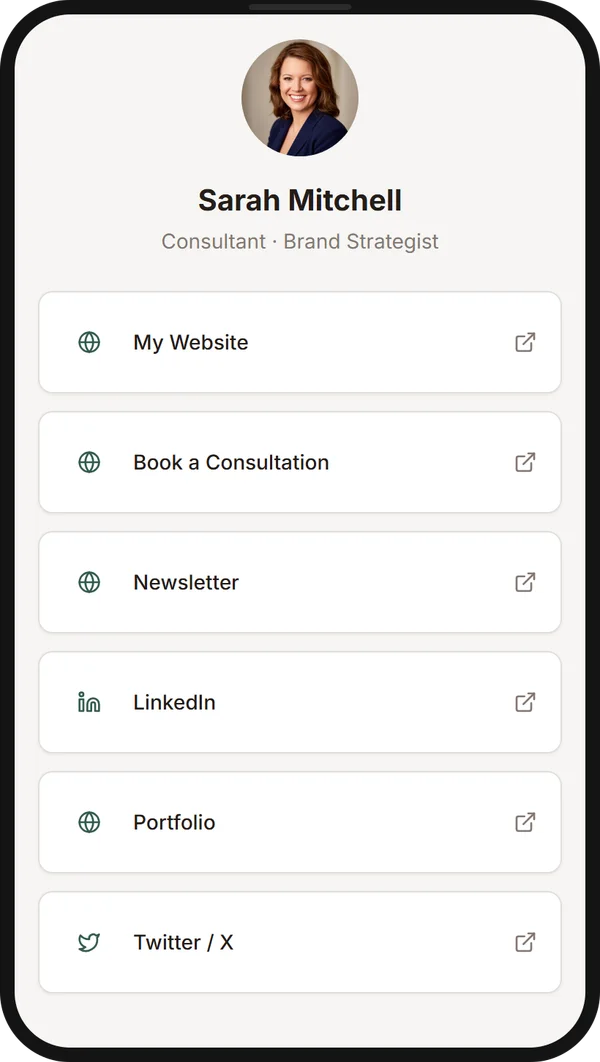
How to put multiple links in one link
Three steps, about 60 seconds, and no design skills needed.
- 1
Create your page
Sign in with Google or LinkedIn. Your link page is created instantly, with no design or coding needed.
- 2
Add all your links
Add your website, social profiles, newsletter, booking page, and anything else. Drag them into any order.
- 3
Share one link
Copy your page URL (profilelinkhub.com/bio/yourname) and paste it wherever a profile, bio, or message only allows one link.
One link for many links: a single page for all your links
Most profiles and messages allow only one link. A single page for all your links fixes that: it holds every destination, and you share just its URL. Visitors open one link and choose where to go.
People also call this one link to multiple links, a link hub, or a link in bio page. It opens a page of links rather than launching several websites at once, so visitors stay in control and you can see what each person clicks.
Without a link page
- • One link allowed, so you pick a favorite
- • Several links to paste and keep updated
- • No idea which link people actually use
With one link for many links
- One link to share everywhere
- Edit your links once and it updates everywhere
- See views and clicks for every link
What you can put behind one link
If it has a URL, it can go on your page.
Website & portfolio
Send people to your best work first.
Newsletter signup
Turn profile visitors into subscribers.
Booking page
Let people book a call without a back-and-forth.
Social profiles
LinkedIn, Instagram, X, TikTok, YouTube, and more.
Resume or deck
Share a CV, pitch deck, or case study.
Anything with a URL
Products, articles, a store, or a community.
Use one link for many links wherever you only get one
Most profiles allow a single website URL. Paste your one link into any of these and everything else rides along.
- LinkedIn profile
- Instagram bio
- X profile
- TikTok bio
- YouTube channel
- Reddit profile
- Email signature
- Business card
- Text or WhatsApp message
Setting it up for LinkedIn specifically? Read the LinkedIn link in bio guide.
What you get in the free trial
Everything is unlocked for 30 days, with no credit card. After that it is $5/month billed annually, plus GST. See the full details on the pricing page.
- Unlimited links on your page
- Click and view analytics, with traffic sources
- Automatic icons for every platform
- Mobile-first page that loads fast
- No ads and no third-party watermark
- A clean page that looks professional on any platform
See what gets clicked
Page views, unique visitors, clicks per link, and traffic sources, so you know which links earn their spot.
Built for phones
Most social clicks happen on mobile, so the page is fast, clean, and easy to tap.
Frequently asked questions
How do I put multiple links in one link?
Create one page that lists all your links, then share that page's URL instead of the individual links. With ProfileLinkHub, you add your links, copy your page URL, and paste it into any profile or message that only allows one link. It takes under 60 seconds.
What does one link for many links mean?
It means sharing a single URL that opens a page containing all your links, so you can send people to your website, socials, newsletter and more without pasting each one separately. You update the page once and every place you shared the link stays current.
Can one link open multiple links at once?
No. One link opens a single page that lists your links, and the visitor chooses which to open. Browsers block pages that try to open several websites at once as pop-ups, so a visible list of links is the reliable way to share many destinations.
What is a single page for all your links?
It is a short, shareable page that lists every link you want to share, such as your website, portfolio, booking page and social profiles. ProfileLinkHub builds it for you in under a minute and gives you one URL to share.
Is it really free?
You can try everything free for 30 days with no credit card required. After the trial it costs $5/month, billed annually, plus GST.
Do I need a credit card to start?
No. You can sign in with Google or LinkedIn and build your page during the 30-day free trial without entering any payment details.
How many links can I add to one link?
As many as you want. ProfileLinkHub has no limit on the number of links on your page. For best results, keep the most important five to eight links at the top.
Where can I use my one link?
Anywhere a single link is allowed: a LinkedIn, Instagram, X, TikTok, YouTube or Reddit profile, an email signature, a business card, a text message, or a presentation slide.
Can I see who clicks my links?
Yes. Built-in analytics show page views, unique visitors, clicks per link, and where your traffic comes from, so you can see which links people actually use.
Keep reading
Put all your links in one link
Create your page in under 60 seconds. Get started free, with no credit card.