Free Linktree alternative with designs that entice clicks
Most link in bio pages look alike, and too many links leave visitors unsure where to click. ProfileLinkHub pages are designed to stand out and to guide people to your best link. Free for 30 days, every feature, no credit card.
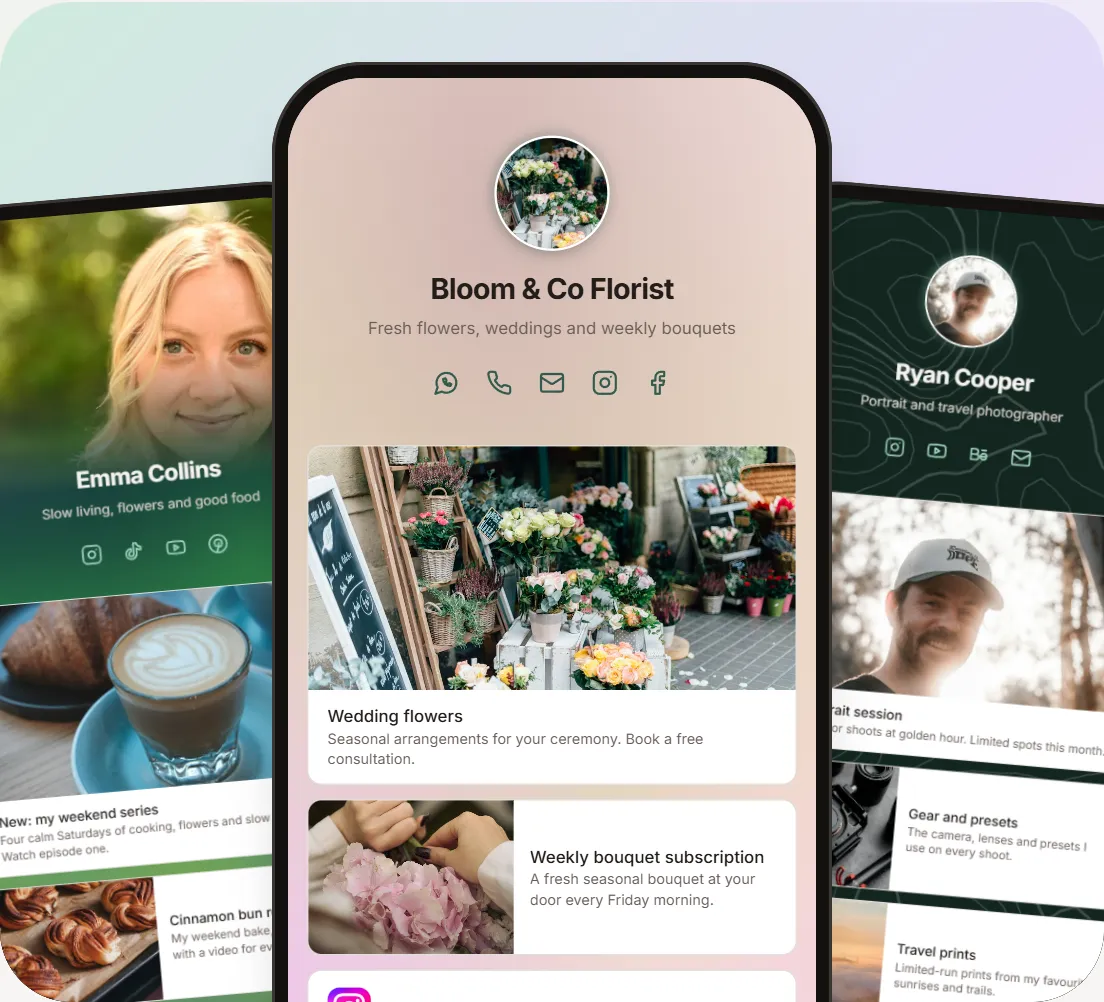
ProfileLinkHub pages
Linktree
Is Linktree free? Yes, but with limits. Linktree Free is $0 and includes unlimited links, a QR code and 28 days of analytics. Linktree branding stays on your page, and SEO settings, Google Analytics and custom backgrounds need the Pro plan, $14 a month billed annually. Checked on linktr.ee/s/pricing, November 8, 2026.
ProfileLinkHub
Is ProfileLinkHub free? Every feature is free for 30 days, no credit card. After that, every feature is included from $4 a month on the yearly plan.
Linktree is a trademark of Linktree Pty Ltd. ProfileLinkHub is not affiliated with or endorsed by Linktree.
About Linktree
Linktree free plan: what you get and 6 limits
Linktree's Free plan covers the basic features. You get unlimited links and 1 featured link, email and phone sign-ups, a QR code, link thumbnails and icons, social icons, free themes with colour, font and button tweaks, link collections, most embeds, up to 1,000 Instagram auto-reply messages a month, and basic analytics for the last 28 days. Checked on linktr.ee/s/pricing, November 8, 2026.
6 limits of Linktree Free
- Linktree branding stays on your page. Hiding the Linktree footer needs Pro, $14 a month billed annually.
- Analytics are short and basic. 28 days, with no referrer, location or device insights (those start on Pro).
- No SEO settings or Google Analytics. Both are Pro features.
- Limited design. Free themes only. Custom backgrounds, advanced themes and button and font styles need Pro.
- Selling is limited. You can sell free products only, and inbox tips carry a 12% fee.
- No email integrations or link scheduling. Syncing sign-ups to tools such as Mailchimp and scheduling links need a paid plan.
When Linktree Free is enough, and when to move on
If you only need a handful of links behind one address, you're fine with Linktree branding, and you don't need to sell or study your visitors, Linktree Free is enough. Move to a paid plan, or to another tool, when you need your own look, longer analytics, SEO settings or a page that guides visitors to one clear first click.
About Linktree
Linktree pricing at a glance
Linktree has four plans. Prices are per month billed annually, with the monthly price in brackets. Checked on linktr.ee/s/pricing, November 8, 2026.
| Linktree plan | Price | What it adds |
|---|---|---|
| Free | $0 | Unlimited basic links, email and phone sign-ups |
| Starter | $7 ($9 monthly) | Personalized page, unlimited featured links, basic analytics |
| Pro | $14 ($17 monthly) | Remove Linktree branding, custom designs, sell with 0% fees, mailing list integrations |
| Premium | $30 ($35 monthly) | Link rules and routing, AI integrations, all-time analytics, data export, social scheduling |
Side by side
Linktree free vs ProfileLinkHub
| Linktree Free | Linktree Pro | ProfileLinkHub | |
|---|---|---|---|
| Price | $0 forever, with limits | $14/mo billed annually ($17 monthly) | Every feature from $4/mo billed yearly ($48/year), or $5 monthly |
| Free trial of every feature | None (limited free plan) | 7 days | 30 days, no credit card |
| Page design | Free themes with colour, font and button tweaks | Advanced themes, custom backgrounds | Designs that vary from page to page, a unique background you can shuffle |
| Link sizes and pictures | 1 featured link | Unlimited featured links, collection layouts | Small, Medium and Large on every link |
| Analytics | Last 28 days, no referrer, location or device insights | Last 365 days, referrer, location and device insights | Source and target (click) analytics |
Information about Linktree comes from its public pricing page, checked November 8, 2026, and may change. Comparisons are our own summary of public information.
About Profile Link Hub
What you get with ProfileLinkHub, free for 30 days
Every feature below is included. Each picture shows a ProfileLinkHub page.
Designed so visitors know where to click
On many link in bio pages every link looks the same, so visitors guess, and guessing visitors often leave without clicking anything. ProfileLinkHub is designed by UX experts and marketers, led by a team with two decades of experience and a UX designer with 15+ years of experience. With ProfileLinkHub, lead with one Large link, back it up with Medium links, and keep the rest as Small rows.
Three link sizes that get tapped
ProfileLinkHub gives every link a size. Small is a clean row with the website's own colorful icon, Medium adds a picture on the left, and Large puts a full-width picture on top. Mix them to lead with your most important link.
Backgrounds that make every page unique
Start with a ProfileLinkHub background such as Aurora, Mesh, Bokeh or Topography. Press Shuffle and it's redrawn with a new random layout, so your page looks like no one else's. Text switches between light and dark so your links stay easy to read.
Know where visitors come from, and what they tap
ProfileLinkHub analytics show where visitors come from, which links they tap, and which days of the week bring the most visitors. Designed by a team with two decades of experience.
Slow pages hurt your conversion
Many link in bio pages take a long time to load, and visitors don't wait. ProfileLinkHub pages are built for phones first, so they open fast. See a live ProfileLinkHub page.
Made to deliver results for all
ProfileLinkHub pages for creators, professionals and small businesses. Each has its own photos, link sizes and background.
About Profile Link Hub
How to make a free link in bio page in 3 steps
- Create your account. Sign in to ProfileLinkHub with Google or LinkedIn. Your 30 free days start now, no credit card.
- Add your links and pick a look. Choose Small, Medium or Large for each link, add a picture, and shuffle a background.
- Put it in your bio. Share your page's address in your Instagram, TikTok, YouTube or LinkedIn profile.
Need more detail? See the step-by-step guide: how to create your link in bio page.
A ProfileLinkHub page gives you one link to share everywhere, so people can find everything you make, sell and recommend. It works for creators, small businesses, consultants and coaches. For LinkedIn, see our guide to adding multiple links to your LinkedIn profile, learn how to put multiple links in one link, or compare more link in bio tools.
ProfileLinkHub pricing
Try everything free for 30 days, no credit card required. After that it's $5/month, $48/year (works out to $4/month), or $109 once for lifetime access. See ProfileLinkHub pricing.
Questions about Linktree's free plan and ProfileLinkHub
About Linktree's free plan
Yes. Linktree's Free plan costs $0 and has no time limit. It includes unlimited links, 1 featured link, email and phone sign-ups, a QR code, link thumbnails and icons, and 28 days of analytics. Linktree branding stays on your page.
Linktree's pricing page lists the Free plan as $0 forever, with restrictions. Features such as hiding the Linktree footer, custom backgrounds, SEO settings, Google Analytics, link scheduling, email integrations and data export need a paid plan.
Yes. Linktree Free includes email and phone number sign-ups. Syncing those contacts to tools such as Mailchimp, Google Sheets or Klaviyo needs a paid plan.
No. Hiding the Linktree footer is a Pro feature, $14 a month billed annually ($17 billed monthly).
Linktree's Free plan is limited on purpose. Removing Linktree branding, custom designs, 0% selling fees and mailing list integrations come with Pro, which is $14 a month billed annually ($17 billed monthly). On Free, you can sell free products only, and inbox tips carry a 12% fee.
If you only need a short list of links, yes. If you want your own look, to see where your visitors come from, or links with pictures, look at other tools.
About ProfileLinkHub
Many link in bio tools exist. ProfileLinkHub is built for creators, professionals and small businesses who want a design-first page, three link sizes with pictures (Small, Medium and Large), and source and target analytics. Every feature is free for 30 days.
Yes. Instagram and TikTok each let you put one link in your bio, and a link in bio page turns it into all your links. With ProfileLinkHub you sign in, add your links, and put your page's address in your Instagram or TikTok bio. Every feature is free for 30 days.
Try everything free for 30 days, no credit card required. After that it's $5/month, $48/year (works out to $4/month), or $109 once for lifetime access.
Your ProfileLinkHub page stays live for the full 30 days. When the trial ends, choose a plan to keep it online. If you don't, your page is paused, but your links and settings are kept, and it comes back as soon as you subscribe.