What Is a LinkedIn Link in Bio Page?
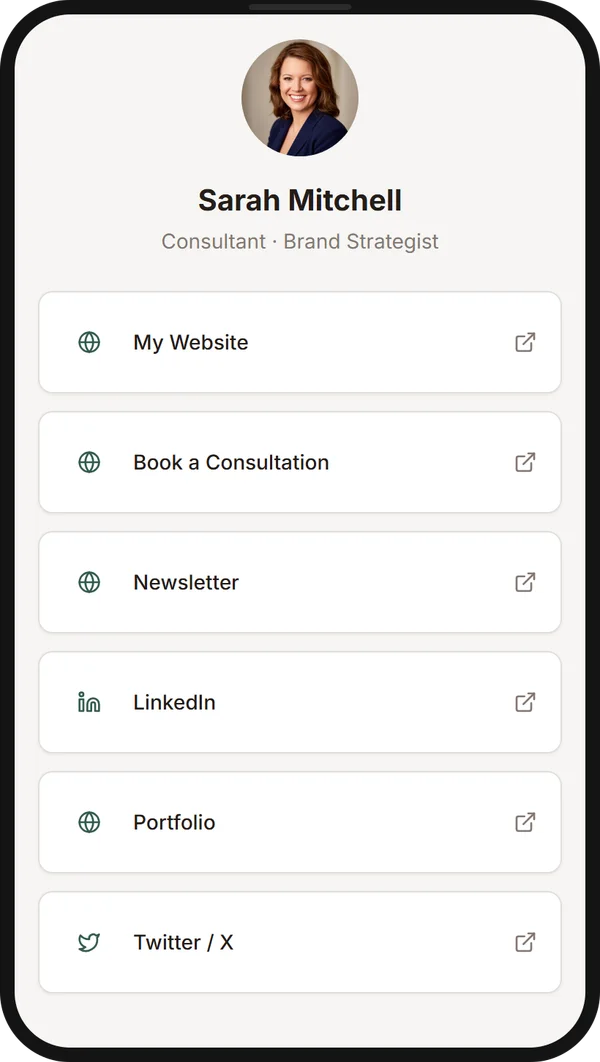
A LinkedIn link in bio page is a single, shareable URL that contains all of your important links in one place. Instead of being limited to the few link slots LinkedIn gives you, you create a dedicated link page that acts as a professional hub for everything you want to share.
A typical link page for LinkedIn professionals includes:
- Personal website or portfolio
- Newsletter signup page
- Product or SaaS landing page
- Booking page for consultations or meetings
- Social profiles — Twitter/X, YouTube, GitHub, etc.
- Case studies or featured work
- Resume or CV
Think of it as a Linktree for LinkedIn — but purpose-built for professionals who want a clean, branded experience. Tools like ProfileLinkHub make it effortless to create your own professional link page in under a minute, with no design or coding skills needed.
Unlike generic link-in-bio tools designed for Instagram influencers, a LinkedIn bio link tool like ProfileLinkHub is optimized for the professional context — clean design, no distractions, and a layout that matches the expectations of recruiters, clients, and collaborators.
Why LinkedIn Professionals Need a Link Page
LinkedIn is the world's largest professional network, with over 1 billion members. Yet the platform limits how you can share links. Your profile has only a few link slots, each with its own restrictions, and link sharing in post bodies is often penalized by the algorithm. A link in bio for LinkedIn page solves this by giving you a single URL that opens up to unlimited destinations.
Here are the most common use cases for a LinkedIn link page:
Founders & Entrepreneurs
Share your product landing page, company blog, investor deck, hiring page, and personal brand — all from one link.
Consultants & Coaches
Link to your booking page, case studies, testimonials, pricing, and free resources to convert profile visitors into clients.
Content Creators
Direct followers to your newsletter, YouTube channel, podcast, merchandise, and community — without choosing just one.
Recruiters & HR Professionals
Share job listings, company culture pages, application forms, and team introductions in a single, organized link page.
Whether you're building a personal brand link page or a creator link page, having a central hub for all your links is no longer optional — it's expected by the people who visit your profile.
Where You Can Add Links on LinkedIn
LinkedIn offers four link placements, and which ones you can use depends on your plan:
- Custom Button: one link, shown on your profile, in messages, on feed posts, and in search results. Eligible Premium Business, Sales Navigator, and Recruiter Lite subscribers only.
- Profile Hyperlink: one link, shown on your profile only. Discontinued, but existing links remain.
- Featured section: available to everyone. Share multiple links by pinning a post that contains them.
- Contact Info: available to everyone, up to 3 websites, behind an extra click.
Each slot holds few links, and none of them can be a full page of destinations. That is why most professionals point one of these slots at a link in bio page. For the full comparison by plan, read how to add links to your LinkedIn profile.
How to Set Up Your LinkedIn Link in Bio Page
Wondering how to add multiple links to LinkedIn? Follow these four simple steps to set up your professional link page in under 60 seconds:
Create your link page on ProfileLinkHub
Sign up at profilelinkhub.com and create your free account. Your personal link page is generated instantly.
Add your important links
Add every link you want to share — your website, portfolio, newsletter, booking page, social profiles, and more. Arrange them in any order.
Copy your ProfileLinkHub URL
Once your links are set, copy your unique ProfileLinkHub page URL (e.g., profilelinkhub.com/bio/yourname).
Paste it in your LinkedIn profile
Go to your LinkedIn profile → Edit → Contact Info → Website and paste your ProfileLinkHub URL. If you have an eligible Premium plan, add it as your Custom Button link too, and on any plan share it in a post pinned to your Featured section. Now anyone who clicks sees all your links.
That's it. You've effectively added multiple links in your LinkedIn profile without breaking any rules. Your LinkedIn link now opens a door to everything you want to share. The same page works on every platform, so see how to put multiple links in one link anywhere only one is allowed.
LinkedIn Link in Bio Examples
Not sure what links to include on your LinkedIn link in bio page? Here are curated examples for different professional roles:
🚀 Founder / Startup CEO
- Company website
- Product demo or free trial
- Blog / thought leadership
- Hiring page
- LinkedIn post archive
- Investor updates or pitch deck
💼 Consultant
- Booking / calendar link
- Case studies
- Services overview
- Testimonials page
- Free resources or lead magnet
- Email contact
🎨 Content Creator
- Newsletter signup
- YouTube channel
- Podcast
- Twitter/X profile
- Merch store
- Community or Discord
📚 Coach / Educator
- Course landing page
- Free workshop registration
- Testimonials
- Book or ebook
- Podcast or blog
- 1:1 coaching booking
🔍 Recruiter / HR
- Open job listings
- Company culture page
- Application form
- Team introductions
- Benefits overview
- Employee testimonials
These examples show how a well-structured LinkedIn link page can transform a single profile link into a powerful professional gateway. With ProfileLinkHub, setting up any of these configurations takes less than a minute.
LinkedIn Link in Bio Best Practices
A few habits separate a link page that gets clicked from one that gets ignored:
- Put your most important link first. Visitors scan top to bottom.
- Use action-oriented labels. "Book a call" beats "Calendly link."
- Keep it to five to eight links. Curate ruthlessly; a wall of 20 options lowers clicks on every one.
- Check it on your phone. Most LinkedIn browsing happens on mobile.
- Add your name and a professional photo. Your link page is a first impression, so treat it like one.
- Update it monthly. Swap in new offers, posts, or events, and use the analytics to see which links get clicked.
- Share it everywhere you can. Put it in your Custom Button, Contact Info, and Featured section, and in your email signature.
Why ProfileLinkHub Is the Best Linktree Alternative for LinkedIn
While Linktree is the most well-known link-in-bio tool, it was originally built for Instagram creators. LinkedIn professionals have different needs — and ProfileLinkHub is designed specifically for them. Here's why it's the best Linktree alternative for LinkedIn:
Professional Design
Clean, minimal layout that matches LinkedIn's professional tone. No flashy colors or distracting animations — just a polished link page that builds trust.
Simple Link Management
Add, edit, reorder, and remove links instantly. No complex dashboards or unnecessary features getting in the way.
Personal Branding
Your name, avatar, and LinkedIn profile are front and center. Every visitor knows exactly who you are and what you do.
Built for LinkedIn Users
Unlike generic tools, ProfileLinkHub is optimized for the LinkedIn ecosystem — from design language to user expectations.
ProfileLinkHub also includes built-in analytics, so you can see how many people visit your link page, which links get the most clicks, and where your traffic comes from. It's the complete LinkedIn bio link tool for professionals who take their online presence seriously.
Other Linktree alternatives for LinkedIn exist, but few combine the simplicity, professional design, and LinkedIn-specific optimization that ProfileLinkHub offers. Whether you're a founder, consultant, creator, or recruiter, your personal brand link page deserves a tool that was built with your audience in mind.
Create Your LinkedIn Link Page
Share multiple links from your LinkedIn profile with one page. Set up your link page in under 60 seconds and start with a 30-day free trial.
Frequently Asked Questions
Can I add multiple links to my LinkedIn profile?
Only in limited ways. LinkedIn lets you add up to 3 websites in Contact Info, share links through a post in your Featured section, and, on eligible Premium plans, add one Custom Button. With a LinkedIn link in bio tool like ProfileLinkHub, you turn any one of those slots into a page that contains every link you care about — recruiters, clients, and followers can then self-select the destination that matches their intent.
Is ProfileLinkHub free?
ProfileLinkHub offers a 30-day free trial with full access — no credit card required. After the trial, it is $5/month billed annually, plus GST. There are no per-click fees, no third-party watermarks, and no upsells.
What is the best Linktree alternative for LinkedIn?
ProfileLinkHub is widely considered the best Linktree alternative for LinkedIn because it's purpose-built for professional use. Linktree's templates and visual language lean toward Instagram and TikTok creators, which often feels out of place when a recruiter or B2B client lands on it.
Where on my LinkedIn profile should I put the link?
If you are on an eligible Premium plan, use the Custom Button: it shows on your profile, in messages, on your feed posts, and in search results. On the free plan, put the link in Contact Info (up to 3 websites) and add a post containing it as the first item in your Featured section. See the full comparison in our guide to adding links to your LinkedIn profile.
Will LinkedIn penalize me for using a link in bio tool?
No. A link in bio page is just a normal URL on a normal domain — LinkedIn treats it like any personal website. The reach penalty applies to outbound links inside post bodies, not links inside your profile or Featured section. For more on routing traffic without triggering that penalty, see our guide to driving traffic from LinkedIn to your website.
How is a link in bio page different from a personal website?
A link in bio page is a focused, single-purpose page that lists your most important destinations. A personal website is a broader brand asset. Most professionals benefit from running both: the website for depth, the link page as the fast routing layer for LinkedIn traffic.
Can I track who clicks my links?
Yes. ProfileLinkHub includes built-in analytics that show total page views, unique visitors, clicks per link, and traffic sources — so you can see which destinations your LinkedIn audience cares about most and double down on what works.
Related guides
How to add multiple links to your LinkedIn profile
Custom Button, Featured, Contact Info, and the Profile Hyperlink compared by plan and visibility.
How to grow on LinkedIn in 2026
A 12-month system for content, profile, and engagement — the content side of the same funnel.
Drive website traffic from LinkedIn
CTA placement, link hubs, comment funnels, and the UTM strategy that survives reality.
Best link in bio tools for LinkedIn creators
Side-by-side comparison of the top tools for B2B professionals and LinkedIn creators.